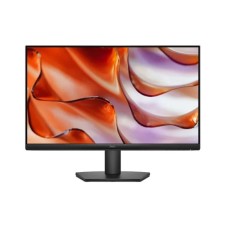
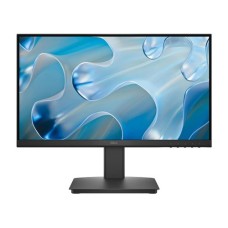
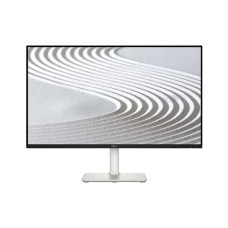
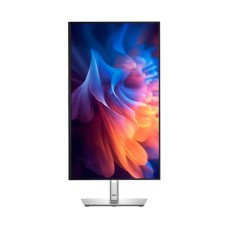
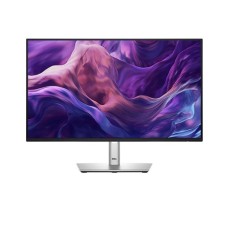
Professional Dell Monitors for Productive Work, Clear Text and Lasting Comfort
Want a monitor your office can count on for years? Dell monitors are built for exactly that. This page shows the latest Dell monitor price in Bangladesh in one place. Compare Dell models by series, size, ports and features. Then pick the one that fits your desk and workload.
Every Dell monitor we sell is genuine and authentic. Our prices stay updated, and stock status is live. You can also compare them with all computer monitors in Bangladesh on our site. No guesswork.
Why Choose a Dell Monitor?
Dell is a global leader in business computers and displays. Banks, offices and universities across Bangladesh rely on Dell. Its monitors are known for solid build and consistent quality.
Dell monitors focus on clear text, smart ergonomics and dependable performance. Many new models run at 100Hz for smoother scrolling. ComfortView Plus reduces blue light without dulling colors.
- IPS panels with sharp text and wide viewing angles
- 100Hz refresh rates on many new models
- ComfortView Plus eye care on selected models
- Height, tilt, swivel and pivot on Dell Pro models
Already working on a Dell laptop for office or study? A Dell monitor gives you a bigger, matching workspace.
Dell monitors are also easy to set up. Plug in power and HDMI, and the screen is ready to use. No extra software is needed for daily work.
Energy use stays low too. Most 24-inch Dell models use under 20 watts in normal use. That helps homes and offices save on electricity bills every month.
Dell Monitor Price in Bangladesh by Budget
Dell monitor price in BD depends on size, series and connectivity. Here is a simple budget guide to get started.
| Budget Tier | Price Range (BDT) | Typical Models | Best For |
|---|
| Budget | Under 16,000 | SE2225HM | Students, basic office tasks |
| Mid-Range | 16,000 to 30,000 | SE2425HM, S2425H, Pro 24 Plus P2425H | Office work, home use |
| Premium | Above 30,000 | Pro 27 Plus P2725H, UltraSharp | Professionals, multi-device setups |
Budget Dell Monitors
Need a reliable screen on a tight budget? The Dell SE2225HM is a smart start. It offers a Full HD display with HDMI and VGA ports.
It connects to both new laptops and older desktop PCs. Great value for students, shops and small offices.
Mid-Range Dell Monitors
This is the most popular tier in Bangladesh. The SE2425HM offers a 23.8-inch IPS screen at 100Hz. Text looks crisp and scrolling feels smooth.
The S2425H adds dual HDMI ports and built-in speakers. The Dell Pro 24 Plus P2425H brings a fully adjustable stand. Compare with HP Series 5 monitors for more choices in this range.
Premium Dell Monitors
Want a complete workstation display? The Dell Pro 27 Plus P2725H offers a 27-inch screen with USB-C. One cable can handle video, data and laptop charging.
Dell UltraSharp monitors serve designers and analysts who need top clarity. They are built for demanding professional work.
Dell Monitor Series Explained
Dell groups its monitors into clear families. Knowing them makes choosing much easier.
Dell SE Series: Essential Value
The SE series covers affordable everyday monitors. Models like the SE2225HM and SE2425HM focus on clear Full HD screens. They are simple, reliable and budget-friendly.
Dell S Series: Style and Entertainment
The S series adds modern design and media features. The S2425H includes built-in speakers and dual HDMI. It suits home offices and entertainment desks.
Dell Pro (P Series): Business Ergonomics
Dell Pro monitors are made for full workdays. They offer height, tilt, swivel and pivot adjustments. Many include USB-C, DisplayPort and USB hubs.
These monitors pair perfectly with a Dell brand desktop PC in corporate offices.
Dell UltraSharp and Alienware
UltraSharp is Dell's premium line for color-critical work. Alienware serves serious gamers with very high refresh rates. Both sit at the top of Dell's range.
Best Dell Monitor for Every User
Every user needs something different. This table helps you match your needs to the right Dell model.
| User Type | Recommended Model | Why It Fits |
|---|
| Students | Dell SE2225HM | Affordable Full HD for study |
| Office Workers | Dell SE2425HM | Smooth 100Hz and clear text |
| Home Office | Dell S2425H | Built-in speakers and dual HDMI |
| Managers and Analysts | Dell Pro 24 Plus P2425H | Fully adjustable stand |
| Laptop Users | Dell Pro 27 Plus P2725H | USB-C single-cable setup |
Short on desk space? A Dell all-in-one PC combines the screen and computer in one body.
Dell vs. Other Monitor Brands
Many buyers compare Dell with other brands before ordering. Dell stands out for business ergonomics and long-term reliability.
If eye comfort and color matter most, compare BenQ eye-care monitors. For budget office displays, Lenovo monitors are another solid option.
Gamers on a budget can also check Acer Nitro gaming monitors with higher refresh rates.
- Choose Dell for business reliability and ergonomic stands
- Choose Dell Pro for USB-C laptop setups
- Choose by ports, stand and warranty, not just price
Key Features to Check Before You Buy
Two Dell monitors may look similar in photos. But stand design and ports can make a big difference.
Panel and Refresh Rate
Most current Dell monitors use IPS panels. They keep colors accurate from wide angles. Many models now run at 100Hz for smoother motion.
Ports and USB-C
Budget models include HDMI and VGA. Pro models add DisplayPort, USB hubs and USB-C. Check your PC or laptop ports before ordering.
- HDMI for modern PCs and laptops
- VGA for older desktops and DVRs
- DisplayPort for daisy-chain and high refresh
- USB-C for video, data and charging in one cable
Stand and Ergonomics
Dell Pro stands adjust height, tilt, swivel and pivot. Pivot lets you rotate the screen for long documents and code. VESA mounts support monitor arms.
Dual Monitor and Laptop Setups with Dell
Dual monitors can boost office productivity a lot. You can keep email on one screen and work on the other. Many offices in Bangladesh now use two screens per desk.
Two Dell SE2425HM monitors make a simple, affordable dual setup. Matching bezels create a clean, continuous view. Dell Pro models also allow daisy-chaining through DisplayPort on supported PCs.
- Use the same model for matching colors and height
- Place the main screen directly in front of you
- Angle the second screen slightly inward
- Use Windows "Extend" mode for two separate desktops
Laptop users can turn a small screen into a full workstation. Connect the Dell Pro 27 Plus with one USB-C cable. Your laptop charges while it shows video.
Raise your laptop to eye level with a sturdy laptop stand. Then use it as a second screen beside your Dell monitor.
This setup keeps your posture healthy and your desk neat. It is ideal for freelancers, students and remote workers.
How to Set Up Your Dell Monitor for Comfort
A good setup protects your eyes, neck and back. Small changes make long workdays easier.
Place the screen at arm's length. Keep the top edge at eye level. Turn on ComfortView Plus or low blue light for evening work.
Choose the highest refresh rate in Windows display settings. Use 1920x1080 resolution for the sharpest picture on Full HD models.
Add a comfortable wired or wireless keyboard to reduce wrist strain during long typing sessions.
Warranty and Care Tips
Many Dell monitors in Bangladesh come with a 3-year warranty. Always check the warranty details on each product page. Keep the box and invoice for claims.
Clean the screen with a dry microfiber cloth. Protect your setup from load-shedding with a reliable UPS for monitors and PCs.
Why Buy Dell Monitors from Tech Valley?
We help you choose the right Dell series, size and ports. Our team tests and compares monitors before recommending them.
- Genuine and authentic Dell monitors
- Updated prices and live stock status
- Clear warranty information on every model
- Honest advice on stands, ports and setup
Complete your desk with a smooth wireless or wired mouse. We help you pick the right gear, not just the most expensive one.
Where to Get Genuine Dell Monitors in Bangladesh?
You can get genuine Dell monitors at Tech Valley. Browse SE, S and Dell Pro models in one place. Compare features and choose your perfect screen.
Order online today and enjoy safe delivery across Bangladesh. Your new monitor arrives securely packed and ready to set up.
Frequently Asked Questions
What is the price of Dell Monitor in Bangladesh?
Dell monitor prices in Bangladesh start under 16,000 BDT for budget SE models. Mid-range monitors cost 16,000 to 30,000 BDT. Premium Dell Pro and UltraSharp models go higher.
What makes a Dell Monitor ideal for office professionals?
Sharp IPS text, ergonomic stands and ComfortView Plus make it ideal. Office professionals get comfortable, reliable performance through long workdays.
Where can I buy a genuine USB-C monitor in Bangladesh?
You can buy genuine USB-C monitors like the Dell Pro 27 Plus from Tech Valley. We offer authentic products and safe delivery across Bangladesh.
Dell vs HP monitor: which is better?
Dell is stronger for ergonomic business stands and USB-C. HP stands out for design and value. Both are reliable office choices.
Does the S2425H have speakers?
Yes, the Dell S2425H includes built-in speakers and dual HDMI ports. It suits home offices and entertainment.
Can I rotate the screen vertically?
Yes, Dell Pro models support pivot rotation. It is useful for coding, reading and long documents.
Are Dell monitors good for gaming?
SE and S models handle casual gaming at 100Hz. Serious gamers should choose Alienware or high refresh gaming monitors.
How much power does a 24-inch model use?
A typical 24-inch Dell monitor uses around 13 to 20 watts. Standby power is under 0.5 watts.
Do these monitors get hot?
No, Dell monitors stay cool in normal use. Keep the vents clear and avoid direct sunlight.
Can I connect two monitors together?
Yes, many Dell Pro monitors support daisy-chaining through DisplayPort. Check the product specs before buying.
What warranty do Dell monitors have in BD?
Many Dell monitors come with a 3-year warranty in Bangladesh. We show warranty details clearly on every product page.