Powerful External Graphics Enclosure Price in Bangladesh for Laptop Gaming and Creative Work
Your thin laptop is great on the move. But it struggles with heavy games, 4K editing and 3D work. An external graphics enclosure fixes that. You plug in one cable, and your laptop gets desktop-class graphics power at your desk.
At Tech Valley, we stock eGPU enclosures and docks for Thunderbolt, USB4 and OCuLink laptops. Before you buy, we help you check one thing: whether your laptop supports it.
What Is an External Graphics Enclosure?
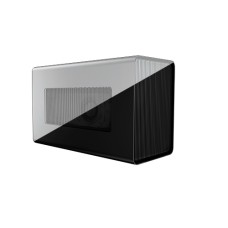
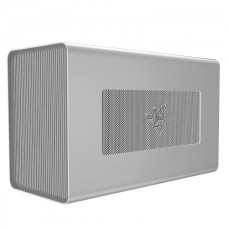
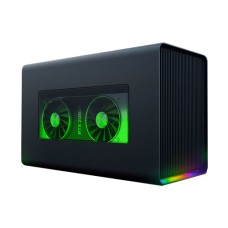
An external graphics enclosure is a box for a desktop graphics card. It has its own power supply, a PCIe slot and a cooling fan.
You install a graphics card inside. Then you connect the box to your laptop with a Thunderbolt, USB4 or OCuLink cable. The laptop uses that card for games and creative apps.
People call it an "eGPU" for short. Some models come with a graphics card already built in. Most are empty, so you add your own card.
Many enclosures do more than graphics. They add USB ports and Ethernet, and some charge your laptop through the same cable. One cable turns your laptop into a full desktop setup.
Will an eGPU Work With Your Laptop?
This is the most important question. An eGPU needs a fast port that carries PCIe data. A normal USB-C port is not enough.
Look for the lightning bolt icon beside the port, or check your laptop's spec sheet.
Buying a new machine for an eGPU? Check the ports in our latest laptop price in Bangladesh with Thunderbolt ports list first.
| Port | Bandwidth for GPU | eGPU Support |
|---|
| Thunderbolt 3 / 4 | About 32 Gbps (PCIe 3.0 x4) | Yes, widely supported |
| Thunderbolt 5 | Up to 64 Gbps (PCIe 4.0 x4) | Yes, newest and fastest Thunderbolt |
| USB4 | Up to 32 Gbps | Only on some laptops; check first |
| OCuLink | About 64 Gbps (PCIe 4.0 x4) | Yes, if your device has the port |
| Plain USB-C 3.2 | Not supported | No |
Thunderbolt 3, 4 and 5
Thunderbolt is the most common eGPU connection. Most Intel business laptops and premium ultrabooks have it.
That makes any model in our premium ultrabook laptop price in Bangladesh range a strong eGPU partner.
Thunderbolt 3 and 4 give the same GPU bandwidth. Thunderbolt 4 just guarantees support on every certified laptop. Thunderbolt 5 doubles the bandwidth, so you lose less speed.
Thunderbolt enclosures also support hot-plugging. You can unplug the laptop and walk away, much like a dock.
USB4
USB4 ports look like normal USB-C. Many AMD Ryzen laptops have them.
But eGPU support on USB4 is optional for the laptop maker. Some USB4 laptops work perfectly. Others don't work at all. Always confirm your exact model before buying.
OCuLink
OCuLink is a direct PCIe cable. It skips the Thunderbolt chip, so it loses less performance.
You find OCuLink ports on some mini PCs, handheld gaming PCs and a few laptops. Without that port, you'd need an M.2 adapter inside the laptop, which is a job for experienced users.
The trade-off: OCuLink doesn't carry charging, USB or hot-plugging. It is a pure graphics link.
What About MacBooks?
MacBooks with Apple Silicon (M1 to M4 and newer) do not support eGPUs at all. Even with Thunderbolt, macOS will not use an external graphics card.
Older Intel MacBooks did support some AMD cards. But those Macs are now rare. If you use a modern MacBook, an eGPU is not the right upgrade.
External Graphics Enclosure Price in Bangladesh by Budget
Price depends on port type, PSU size and brand, and on whether a graphics card is included. These are rough ranges, because dollar rates and new launches move prices often.
| Budget (BDT, approx.) | What You Get | Best For |
|---|
| 8,000 – 18,000 | OCuLink dock, open frame, no PSU or a small one | Mini PCs, handhelds, budget builders |
| 18,000 – 35,000 | Thunderbolt 3/4 dock or compact enclosure | Ultrabook users, light gaming |
| 35,000 – 60,000 | Full Thunderbolt enclosure with a large PSU and laptop charging | Serious gamers, creators |
| 60,000+ | Thunderbolt 5 enclosure, or a box with a built-in GPU | Power users, plug-and-play buyers |
Most buyers get the best value from a mid-range Thunderbolt enclosure. It fits large cards and charges the laptop through one cable.
Choose an OCuLink dock only if your device has the port. It is the cheapest option and gives the most performance per taka.
Total Cost: Enclosure + GPU + Power
Many buyers forget this part. Most enclosures come empty, so the graphics card is a separate cost.
Pick a card that matches your port and budget. Compare the latest desktop graphics card price in Bangladesh before you plan your setup.
Some open-frame docks also need a separate ATX or SFX power supply. Check this before you order.
| Setup | Enclosure | Graphics Card | PSU | Total (approx.) |
|---|
| Budget OCuLink | 10,000 | Entry 1080p card | Separate, ~6,000 | Lowest overall |
| Mid Thunderbolt | 35,000 | Mid-range 1440p card | Included | Balanced |
| High-end Thunderbolt 5 | 60,000+ | High-end 4K card | Included | Highest |
Plan your budget as one package. A cheap enclosure with a strong card can beat a premium enclosure with a weak one.
How Much Performance Do You Lose?
An eGPU is slower than the same card inside a desktop. The cable has less bandwidth than a desktop's PCIe x16 slot.
- Thunderbolt 3/4: about 15–30% slower than a desktop
- Thunderbolt 5 and OCuLink: about 5–15% slower
- Using the laptop's own screen: a further 10–20% loss, because frames travel back through the cable
The fix is simple. Connect an external monitor directly to the graphics card. This removes the extra trip and gives the best frame rates.
The loss is also smaller at higher resolutions. At 1440p and 4K, the GPU works harder and the cable matters less.
Even with the loss, an eGPU is often 3 to 5 times faster than a laptop's built-in graphics. For ultrabook owners, the jump is huge.
eGPU vs Gaming Laptop vs Desktop PC
Which gives you the best value? It depends on how you work and where you play.
| Point | eGPU + Ultrabook | Gaming Laptop | Desktop PC |
|---|
| Portability | Light laptop on the move | Heavy, short battery | Not portable |
| Gaming power | High at the desk | High anywhere | Highest |
| Upgrades | Swap the GPU anytime | Very limited | Full upgrades |
| Battery life | Long ultrabook battery | 3–5 hours | Not applicable |
| Noise and heat | Heat stays in the box | Hot and loud on the lap | Easy to cool |
| Best for | Work by day, play at home | Gaming while travelling | Home-only power users |
An eGPU makes sense if you already own a Thunderbolt laptop. You keep a light work machine and add gaming power at home.
If you game while travelling, a gaming laptop is the better choice. See the current gaming laptop price in Bangladesh to compare costs.
If you never move your setup, a desktop gives the most performance per taka. Start with the latest Intel and AMD processor price in Bangladesh for your build.
Best eGPU Setup by Use
Every user needs something different from an eGPU. Here is what we suggest for the four most common setups.
Gaming at Home
Connect a 1440p or 4K monitor directly to the graphics card. This gives the best frame rates.
A mid-range card is the sweet spot for 1440p gaming. Higher-end cards lose more to Thunderbolt bandwidth, so pair them with Thunderbolt 5 or OCuLink.
Add a mechanical keyboard and mouse to the enclosure's USB ports. Your laptop becomes a full gaming rig with one plug.
Find a mouse, cooling pad or stand among our laptop accessories for a gaming desk setup.
Video Editing and 3D
Creative apps such as Premiere Pro, DaVinci Resolve and Blender use the GPU heavily. An eGPU cuts render and export times a lot.
Choose a card with at least 12GB VRAM for 4K timelines and 3D scenes. Bandwidth matters less here than in gaming, so Thunderbolt 4 works well.
Large video files need fast storage too. A fast NVMe or portable SSD for video editing keeps your timeline smooth.
AI and Machine Learning
Local AI tools need lots of VRAM. An eGPU lets an ultrabook run image generators and local language models.
Pick an NVIDIA card with 16GB VRAM or more. Most AI tools use NVIDIA's CUDA. Once a model loads into VRAM, cable speed hardly matters.
Multi-Monitor Office Desk
Traders, analysts and developers often want three or four screens. Laptop graphics can't drive them all smoothly.
Even an entry-level card in an eGPU handles several displays easily. A Thunderbolt enclosure also charges your laptop and adds Ethernet, so your desk needs just one cable.
Features to Check Before Buying
- Port match: Thunderbolt, USB4 or OCuLink must match your laptop.
- PSU wattage: It must cover your graphics card plus laptop charging. 650W and above suits most high-end cards.
- Card size: Check the maximum length, height and slot width the box accepts.
- Laptop charging: Look for 85W to 100W Power Delivery so one cable does everything.
- Extra ports: USB-A and Ethernet turn the box into a docking station.
- Cooling and noise: A larger fan stays quieter under heavy load.
Our main advice is simple: check your port first, then the card size, then the PSU. Get those three right and the rest is easy.
Popular External Graphics Enclosure Models
| Model | Connection | Key Strength | Best For |
|---|
| Razer Core X / Core X Chroma | Thunderbolt 3 | Large PSU, fits big cards | Gaming and creative work |
| Razer Core X V2 | Thunderbolt 5 | Higher bandwidth, less speed loss | Newest Thunderbolt 5 laptops |
| Sonnet Breakaway Box | Thunderbolt 3 | Reliable, quiet | Creators and offices |
| Gigabyte Aorus Gaming Box | Thunderbolt 3 | GPU built in, compact | Plug-and-play buyers |
| ASUS ROG XG Mobile | ASUS proprietary | Tiny, GPU built in | Compatible ASUS laptops and handhelds only |
| Minisforum DEG1 / Aoostar AG02 | OCuLink | Lowest loss, low price | Mini PCs and handhelds |
A box with a built-in GPU is easy to set up, but you can't upgrade the card later. Empty enclosures cost more over time but last through several card upgrades.
Where Can I Find External Graphics Enclosure at the Best Price in BD?
You can find external graphics enclosures at the best price at Tech Valley. We sell genuine Thunderbolt and OCuLink models with official warranty, online or in our store.
Send us your laptop model before you order. Our team will confirm your port supports an eGPU and suggest a matching card and enclosure.
We deliver across Bangladesh and offer EMI on major bank cards.
Frequently Asked Questions
What is the external graphics enclosure price in Bangladesh?
Prices start around 8,000 taka for OCuLink docks. Thunderbolt enclosures cost about 18,000 to 60,000 taka or more. Graphics cards are usually sold separately.
Does an eGPU work with any laptop?
No. Your laptop needs Thunderbolt 3, 4 or 5, a supported USB4 port, or OCuLink. A plain USB-C port cannot run an eGPU.
Can I use an eGPU with a MacBook?
No, not with Apple Silicon MacBooks. M-series Macs do not support external graphics cards. Only older Intel Macs supported some AMD cards.
How much performance does an eGPU lose?
Thunderbolt 3 and 4 lose about 15–30%. Thunderbolt 5 and OCuLink lose about 5–15%. An external monitor reduces the loss further.
Is an eGPU better than a gaming laptop?
It is better if you want a light laptop for work and gaming power at home. For gaming while travelling, a gaming laptop is better.
What is OCuLink and is it faster than Thunderbolt?
Yes, OCuLink is faster. It is a direct PCIe 4.0 x4 link with less speed loss. But it doesn't charge your laptop or carry USB data.
Does the enclosure come with a graphics card?
Most enclosures do not. You buy the card separately. Some models, like the Aorus Gaming Box and ROG XG Mobile, have a GPU built in.
Which graphics card fits in an eGPU enclosure?
Most full-size desktop cards fit, if they match the box's length, slot width and PSU limits. Always check the enclosure's card size spec first.
Can an eGPU charge my laptop?
Yes, many Thunderbolt enclosures can. They supply 85W to 100W through the same cable. OCuLink docks cannot charge laptops.
Where can I buy an external graphics enclosure in BD?
You can buy one from Tech Valley. We sell genuine models with warranty, check your laptop's compatibility, and deliver across Bangladesh.