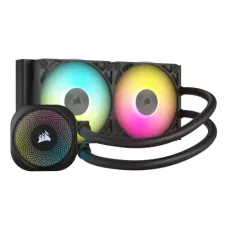
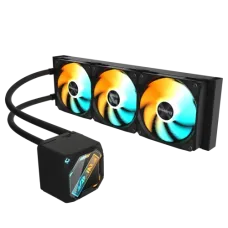
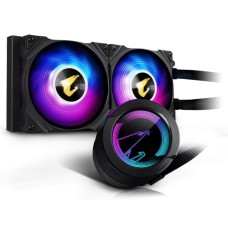
Efficient Liquid CPU Cooler Price in Bangladesh for Cooler, Quieter Gaming PCs
Modern processors run hot, and Bangladesh's summers make it worse. When a CPU overheats, it slows itself down. Games stutter, renders take longer and fans roar. A liquid CPU cooler pulls that heat away fast and keeps your PC cool, quiet and steady.
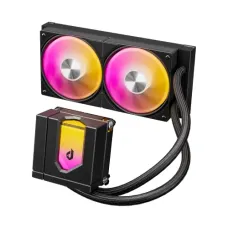
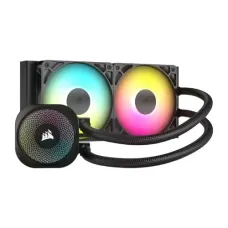
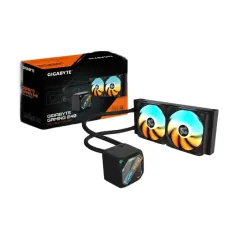
At Tech Valley, we sell genuine all-in-one (AIO) liquid coolers, from budget ARGB models like the Uphere E240KC to premium 360mm units. On this page, we help you choose the right radiator size, check the fit and keep your cooler running for years.
How a Liquid CPU Cooler Works
An AIO liquid cooler is a sealed loop with four main parts:
- Pump block: sits on the CPU and moves liquid through the loop.
- Tubes: carry warm liquid away and cool liquid back.
- Radiator: a thin metal grille where heat leaves the liquid.
- Fans: blow air through the radiator to remove the heat.
The pump block has a copper base that touches the CPU. Heat passes into the liquid, travels to the radiator, and the fans push it out of the case.
AIO coolers come sealed and pre-filled from the factory. You never refill them. Installation is about as easy as a large air cooler.
Still deciding between air and liquid? Compare both types in our air and liquid CPU cooler price in Bangladesh range.
Because the radiator sits at the edge of the case, the area around the CPU stays open. This looks clean, shows off your motherboard and leaves plenty of room for tall RAM.
That makes AIOs a great match for tall heatsink kits from our RGB DDR5 desktop RAM price in Bangladesh list.
Liquid CPU Cooler Price in Bangladesh by Radiator Size
Radiator size is the biggest price factor. Larger radiators remove more heat. These ranges are approximate and change with brand, features and dollar rates.
| Radiator Size | Fans | Price (BDT, approx.) | Best For |
|---|
| 120mm | 1 × 120mm | 4,500 – 7,000 | Small cases, low-to-mid power CPUs |
| 240mm | 2 × 120mm | 6,500 – 13,000 | Core i5/i7, Ryzen 5/7 gaming builds |
| 280mm | 2 × 140mm | 10,000 – 17,000 | Ryzen 7 X3D, Core Ultra 7, quiet builds |
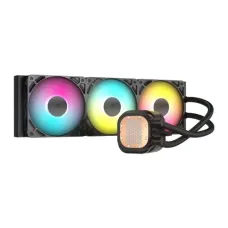
| 360mm | 3 × 120mm | 11,000 – 22,000 | Ryzen 9, Core Ultra 9, Core i9 |
| 360mm with LCD | 3 × 120mm | 18,000 – 35,000+ | Showcase builds, streamers |
Most gamers get the best value from a 240mm AIO. Budget ARGB models in this size, such as the Uphere E240KC, give strong cooling and colourful lighting at a fair price.
Want the cooler pre-installed and tested? Our liquid-cooled gaming PC price in Bangladesh builds come ready to play.
Choose 280mm or 360mm for hotter processors or if you want lower fan noise. Bigger radiators let fans spin slower for the same cooling.
Skip 120mm AIOs for hot chips. A good tower air cooler often performs better for less money.
Which Radiator Size Do You Need?
Match the radiator to your processor's heat output. Then add one step of headroom for Bangladesh's hot rooms, where temperatures often reach 30–35°C.
| Processor | Minimum Radiator | Our Pick for BD Summers |
|---|
| Core i5, Ryzen 5 | 240mm | 240mm |
| Core Ultra 5 K, i5 K-series, Ryzen 7 | 240mm | 240mm or 280mm |
| Ryzen 7 X3D, Core Ultra 7, Core i7 | 240mm | 280mm or 360mm |
| Ryzen 9, Core Ultra 9, Core i9 | 280mm | 360mm |
Not sure which chip you'll use? Check heat output and prices in our Intel and AMD processor price in Bangladesh list.
A 280mm radiator uses two 140mm fans. It often cools as well as a 360mm and runs quieter than a 240mm. It's a smart middle choice if your case supports it.
If you're unsure, choose the larger size your case can fit. Extra headroom keeps temperatures and noise lower during long gaming sessions and summer heat.
Gaming on the move? Laptops use built-in cooling, so compare the gaming laptop price in Bangladesh instead.
Budget vs Premium AIO: What Changes?
AIO prices range widely. A budget 240mm and a premium 360mm both cool well, but they differ in several ways. Here's what extra money buys you.
| Point | Budget AIO | Mid-Range AIO | Premium AIO |
|---|
| Price (BDT, approx.) | 6,500 – 9,000 | 9,000 – 16,000 | 16,000 – 35,000+ |
| Cooling | Good for mid-range CPUs | Strong for most gaming CPUs | Strongest, for hot flagship CPUs |
| Pump noise | Can hum at full speed | Quieter, better speed control | Very quiet, fine control |
| Fans | Basic ARGB fans | Better bearings, wider speed range | Premium, very quiet fans |
| Warranty | 1–2 years | 3–5 years | 5–6 years |
| Extras | ARGB lighting | ARGB, better software | LCD screen, premium build |
Budget ARGB AIOs, like the Uphere E240KC, are a great entry into liquid cooling. They suit Core i5, Ryzen 5 and many Ryzen 7 builds that want colour and a clean look on a tight budget.
Mid-range AIOs offer the best balance for most gamers. You get quieter pumps, better fans and longer warranty.
Premium AIOs make sense for Ryzen 9, Core Ultra 9 and Core i9 chips, or for showcase builds where silence and style matter most.
Planning a full high-end build? A Gigabyte PC bundle with matched core parts pairs well with a premium AIO.
Key Parts to Check
Two AIOs of the same size can perform very differently. These parts make the real difference.
Pump
The pump is the heart of the AIO. If it fails, the cooler stops working.
Look for a pump with good speed control. A PWM-controlled pump can slow down during light use, which reduces noise.
Check the pump warranty. A longer warranty shows the brand trusts its pump. Three years or more is a good sign.
Listen for noise reviews. A low hum is normal, but loud whining or rattling is not.
Radiator and Tubes
Most AIO radiators are aluminium. They're light and cool well. Thicker radiators hold more liquid and remove more heat, but need more case space.
Tube length matters for mounting. Longer tubes let you place the radiator at the front of a large case. Short tubes may only reach the top.
Sleeved tubes look neater and resist kinks. Check that the tubes bend smoothly without pinching.
Fans
Fans move air through the radiator. Better fans cool more with less noise.
- Bearing type: fluid dynamic or hydraulic bearings last longer and run quieter.
- Speed range: a wide range, such as 500–2000 RPM, allows quiet idle and strong cooling under load.
- Static pressure: radiator fans need high static pressure to push air through the fins.
You can replace stock fans later with better ones. This is a cheap upgrade that can lower noise.
ARGB and LCD
ARGB lighting adds colour to the pump and fans. It connects to a 3-pin 5V ARGB header on your motherboard and syncs with other RGB parts.
Match your cooler's lighting with RGB keyboards, mice and headsets from our RGB gaming accessories collection.
Don't confuse ARGB (3-pin, 5V) with older RGB (4-pin, 12V). Plugging into the wrong header can damage the lights. Check your board's headers first.
Some premium AIOs add an LCD screen to the pump. It can show CPU temperature, images or animations. It looks great but doesn't improve cooling.
Will It Fit Your Case?
Most AIO problems are fit problems. Check these points before you buy.
| Check | What to Look For | Common Limit |
|---|
| Radiator support | Case accepts 240, 280 or 360mm | Small cases may take only 240mm |
| Mounting location | Front, top or side mounts | Top mounts may be limited to 240mm |
| Radiator thickness | Radiator + fans thickness | About 52–55mm in total |
| Top clearance | Space above the motherboard | Tall VRM heatsinks or RAM may clash |
| Tube length | Long enough for your chosen position | Usually 400mm for most mounts |
| Socket support | AM4, AM5, LGA1700, LGA1851 brackets | Check the listed sockets |
Check your case's specification sheet for radiator support. Many mid-tower cases accept 360mm at the front and 240mm or 280mm on top.
Measure clearance for top mounting. A radiator plus fans can hit tall RAM or motherboard heatsinks in some cases.
Socket support is simple for modern AIOs. AM4 and AM5 share mounting holes, and LGA1700 brackets fit LGA1851 boards. Always confirm the listed sockets before ordering.
Prefer to skip the fit checks? Choose a ready system from our desktop PC price in Bangladesh range with cooling already matched.
Mounting the Radiator the Right Way
Where you mount the radiator affects temperatures, noise and pump life. Get this right and your AIO will run better for longer.
Top mounting is usually the best choice. Hot air from the radiator goes straight out of the case. Air bubbles also rise to the radiator, away from the pump.
Front mounting gives the radiator cool outside air, so CPU temperatures can be a little lower. The trade-off is that the warmed air flows over the graphics card. If you front-mount, keep the tubes at the bottom of the radiator.
Running a hot, high-end card? Check its length and cooling in our gaming graphics card price in Bangladesh list before you choose a mount.
Follow one simple rule: the pump should never be the highest point in the loop. Air collects at the top. If it gathers in the pump, you'll hear gurgling and the pump wears faster.
Set the fan direction to match your case airflow:
- Top radiator: fans blow air out of the case (exhaust).
- Front radiator: fans pull air into the case (intake).
Balance your case with other fans. Use at least one exhaust fan at the back so hot air leaves quickly.
Is Liquid Cooling Safe?
Many buyers worry about leaks. The short answer: quality AIOs are very safe.
AIO coolers are sealed at the factory and pressure-tested. You never open or refill them. Leaks are rare, especially with trusted brands.
A few simple habits lower the risk even further:
- Buy from a trusted brand with a multi-year warranty.
- Don't bend or pinch the tubes tightly during installation.
- Don't twist the fittings where tubes meet the pump or radiator.
- Check the cooler visually when you clean your PC.
Some premium brands also offer leak coverage that pays for damaged parts. Ask about this when choosing a high-end AIO.
The liquid inside is mostly water with additives. It's designed not to corrode the cooler's metal parts.
Prefer a computer with no cooling setup at all? Browse our all laptop price in Bangladesh list for ready-to-use options.
Care and Lifespan
AIOs need very little care. A few minutes every couple of months keeps them working well.
- Clean dust: blow dust from the radiator fins and fans every two to three months.
- Check fans: make sure all fans spin smoothly and quietly.
- Listen to the pump: a sudden new rattle or loud gurgle may signal wear.
- Replace thermal paste: every two to three years for best contact.
Dust builds up quickly in Bangladesh. A clogged radiator can raise CPU temperatures by several degrees. Use dust filters on your case intake fans.
Heat affects storage too. Fast drives can slow down when hot, so pick an NVMe SSD with heatsink for gaming PCs.
Most AIOs last five to seven years. Pump wear is the usual limit. When temperatures rise even after cleaning, it may be time to replace the cooler.
Watch your CPU temperature now and then with free software. A steady rise over months is an early warning sign.
Need a low-maintenance machine for work or study too? See our original laptop price in Bangladesh range.
Where to Buy Liquid CPU Cooler Online in BD?
You can buy liquid CPU coolers online from Tech Valley. We sell genuine 120mm, 240mm, 280mm and 360mm AIOs, from budget ARGB models like the Uphere E240KC to premium coolers, all with official warranty.
Tell us your processor, motherboard and case. Our team will check radiator support, clearance and socket brackets before you order.
We deliver across Bangladesh and offer EMI on major bank cards. Ask about combo offers with processors and cases.
Frequently Asked Questions
What is the liquid CPU cooler price in Bangladesh?
Liquid CPU coolers cost about 4,500 taka for 120mm models to over 35,000 taka for premium 360mm LCD AIOs. Most 240mm coolers cost 6,500 to 13,000 taka.
Is a 240mm AIO enough for gaming?
Yes for most Core i5, Ryzen 5 and many Ryzen 7 gaming builds. For Ryzen 9, Core Ultra 9 and Core i9, choose 360mm.
240mm or 360mm: which should I buy?
Choose 240mm for mid-range CPUs and smaller cases. Choose 360mm for hot flagship processors and quieter cooling in Bangladesh's heat.
Do liquid coolers leak?
Rarely. Quality AIOs are sealed and pressure-tested at the factory. Choose a trusted brand with a multi-year warranty for extra peace of mind.
How long does an AIO last?
Most AIOs last five to seven years. Pump wear is the usual limit. Regular dust cleaning helps them last longer.
Where should I mount the radiator?
Top mounting is usually best. Front mounting also works well. Keep the pump below the radiator's highest point to avoid air in the pump.
Does my AIO support AM5 or LGA1851?
Most modern AIOs support AM5, AM4, LGA1700 and LGA1851. Always check the listed socket support before buying.
Is a budget AIO worth it?
Yes for mid-range CPUs. Budget ARGB AIOs like the Uphere E240KC cool well and look great. Premium models add quieter pumps and longer warranty.
Do I need to refill a liquid cooler?
No. AIO coolers are sealed and pre-filled. They only need regular dust cleaning, not refilling.
Where can I buy a liquid CPU cooler in BD?
You can buy liquid CPU coolers from Tech Valley. We offer genuine AIOs, official warranty, fit checks and delivery across Bangladesh.