Practical Laptop Accessories Price in Bangladesh for Every Daily Laptop Problem
Every laptop has weak spots. It runs hot in summer. It has too few ports. The battery dies in a meeting. Your neck aches after a long day. The right accessory fixes each of these problems, often for less than 2,000 taka.
At Tech Valley, we stock laptop accessories for students, office workers, gamers and travellers. On this page, we start with your problem and then show the accessory that solves it.
Why Laptop Accessories Matter
A laptop is built to be thin and light. To save space, makers cut ports, shrink batteries and squeeze the cooling system. Accessories add those things back when you need them.
They also protect your investment. A 500-taka sleeve can save a 1-lakh laptop from a cracked screen. A cooling pad can stop the heat that slowly wears out a battery.
Still choosing your machine? Browse our original laptop price list in Bangladesh and plan your accessories together.
Comfort matters too. Hunching over a laptop for hours strains your neck and wrists. A stand, a mouse and a keyboard turn any laptop into a healthy desk setup.
Many laptops last five years or more. The right accessories keep them useful, safe and comfortable for that whole time.
Laptop Accessories Price in Bangladesh at a Glance
Here is a quick price guide for the accessories our buyers ask about most. Prices are approximate and change with brand, model and dollar rates.
| Accessory | Price Range (BDT, approx.) | Problem It Solves |
|---|
| Cooling pad | 800 – 4,500 | Overheating, slowdowns |
| USB-C hub (5–8 ports) | 1,500 – 6,000 | Too few ports |
| Docking station | 8,000 – 35,000 | One-cable desk setup |
| Laptop charger / GaN charger | 1,500 – 7,000 | Lost or slow charger |
| Laptop power bank (65W–100W) | 4,500 – 12,000 | Load-shedding, travel |
| Laptop stand | 800 – 5,000 | Neck pain, poor posture |
| Wireless mouse | 500 – 6,000 | Touchpad strain |
| External keyboard | 1,000 – 10,000 | Typing comfort |
| Sleeve, cover, cleaning kit | 300 – 2,500 | Scratches, dust, spills |
| USB Wi-Fi adapter / headset | 600 – 8,000 | Weak signal, poor call audio |
Most buyers start with three things: a mouse, a stand and a USB-C hub. Together they cost about 3,000 to 6,000 taka and change your daily experience the most.
See every item and current offer in our genuine laptop accessories collection in Bangladesh.
Fix Common Laptop Problems With the Right Accessory
Start with the problem that bothers you most. Then pick the accessory below that fixes it.
"My Laptop Gets Too Hot": Cooling Pads
Summer heat in Bangladesh pushes laptops hard. When a laptop gets too hot, it slows itself down to stay safe. Games stutter and exports take longer.
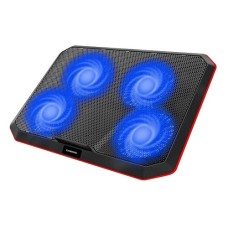
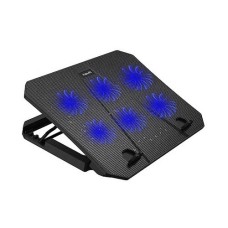
A cooling pad lifts the laptop and pushes cool air underneath. It works best for laptops with vents on the bottom, which includes most gaming laptops.
Buying a new machine for heavy games? Check the gaming laptop price in Bangladesh and pair it with a strong cooling pad.
- Tilted design: improves airflow and typing angle
- Large fans: move more air at lower noise
- Adjustable speed: quiet for work, strong for gaming
- USB passthrough: saves a port on your laptop
A cooling pad usually lowers temperatures by a few degrees. It helps, but it can't fix clogged vents. If your laptop is still very hot, get the inside cleaned and the thermal paste replaced.
"I Need More Ports": USB-C Hubs and Docks
Thin laptops often have only two USB-C ports. You can't connect a monitor, a mouse, a pen drive and a charger at the same time.
This is common on every model in our premium ultrabook laptop price in Bangladesh range, so a hub is a smart add-on.
A USB-C hub fixes this. One small adapter adds HDMI, USB-A, an SD card reader and sometimes Ethernet.
Choose a hub with Power Delivery (PD) passthrough. This lets you charge your laptop through the hub while using every port.
Check the HDMI spec too. A cheap hub may only output 4K at 30Hz, which feels laggy. Look for 4K at 60Hz for smooth work on a big screen.
"My Battery Dies Fast": Chargers and Power Banks
Load-shedding and long trips drain laptop batteries quickly. A second charger or a laptop power bank keeps you working.
Most modern laptops charge over USB-C. A GaN charger is smaller and cooler than an old brick, and one unit can charge your laptop, phone and earbuds.
For power cuts, choose a power bank with 65W or 100W USB-C PD output. Phone power banks with 18W or 20W output are too weak for most laptops.
If your battery drains fast even at full charge, it may be worn out. A battery health check will tell you whether it needs replacing.
"My Neck and Wrists Hurt": Stands, Mouse and Keyboard
A laptop screen sits too low. You look down for hours, and your neck and shoulders pay the price.
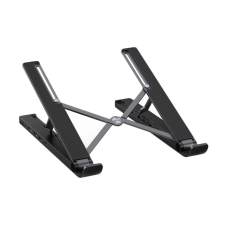
A laptop stand raises the screen to eye level. Aluminium stands are strong and help cooling. Foldable stands fit in a bag for cafés and offices.
Once the screen is raised, the keyboard is too high to type on comfortably. That is why a stand works best with an external mouse and keyboard.
- Wireless mouse: reduces wrist strain from the touchpad
- Vertical mouse: keeps your wrist in a natural handshake position
- Low-profile keyboard: feels close to a laptop keyboard
- Mechanical keyboard: gives better feedback for long typing sessions
Pick Bluetooth devices if your laptop has few ports. Pick a 2.4GHz receiver for a faster, more stable connection.
"I Want to Protect My Laptop": Sleeves, Covers and Cleaning
Small accidents cause big repair bills. A drop, a tea spill or dust in the keys can damage a laptop quickly.
A padded sleeve protects against scratches and bumps inside your bag. A silicone keyboard cover blocks dust and small spills. A matte screen protector cuts glare and fingerprints.
For daily commutes, a sleeve alone is not enough. Choose a padded water-resistant laptop bag for rain and rough roads.
Clean your laptop every few weeks. A soft microfibre cloth, a screen spray and a small air blower are enough. Dust is the main cause of overheating in Bangladesh.
"My Wi-Fi or Sound Is Weak": Adapters and Headsets
Older laptops may only support Wi-Fi 5 or slower. A USB Wi-Fi 6 adapter can boost speed and range on a newer router.
Need a wired connection? A USB-to-Ethernet adapter gives you stable internet for big downloads and video calls.
Laptop microphones pick up fan noise and street sounds. A USB or Bluetooth headset with a noise-cancelling mic makes you sound clear in Zoom and Teams calls.
Charger Compatibility Guide
The wrong charger can charge your laptop slowly or not at all. Check these things before you buy.
| Check | What to Look For | Why It Matters |
|---|
| Connector | USB-C or barrel pin (size must match) | A wrong pin won't fit or may not charge |
| Wattage | Equal to or higher than your original charger | Lower wattage charges slowly or drains during use |
| Voltage (barrel chargers) | Same as the original, e.g. 19V or 20V | Wrong voltage can damage the laptop |
| USB-C PD support | PD 3.0 with 65W, 100W or 140W | Laptops need PD to charge over USB-C |
| Certification | Original or trusted brand with safety marks | Cheap chargers can overheat |
You can use a higher-wattage USB-C charger safely. The laptop only takes the power it needs.
Gaming laptops are different. Most use a large barrel charger of 180W to 330W. A USB-C charger can only top them up slowly, so keep the original brick for gaming.
Hub vs Dock: Which Do You Need?
Hubs and docks both add ports, but they suit different setups.
| Point | USB-C Hub | Docking Station |
|---|
| Size | Pocket-size | Desktop box |
| Power | Uses your laptop's charger via PD passthrough | Has its own power supply |
| Monitors | Usually one | Two or three, often 4K |
| Ports | 4 – 8 | 10 – 15 |
| Price (approx.) | 1,500 – 6,000 taka | 8,000 – 35,000 taka |
| Best for | Travel, students, light desk use | Office desks, multi-monitor work |
A hub is enough for most people. Choose a dock if you use two monitors or plug in many devices every day.
For a Thunderbolt laptop, a Thunderbolt dock gives the most bandwidth and charges the laptop through one cable.
Thunderbolt can also run a desktop graphics card. Add an external graphics enclosure for laptops to game or edit video at your desk.
Pair the enclosure with the right card. Compare the latest graphics card price in Bangladesh before you build your setup.
MacBooks with base M-series chips may support only one external monitor. Check your Mac model before buying a dual-monitor dock.
Accessory Kits by User Type
Not sure where to start? These ready-made kits match common routines. Totals are approximate.
Students
Students need low-cost basics that last through busy semesters.
| Accessory | Approx. Price (BDT) |
|---|
| Wireless mouse | 600 – 1,200 |
| Padded sleeve | 500 – 1,000 |
| Foldable laptop stand | 800 – 1,500 |
| Basic USB-C hub | 1,500 – 2,500 |
| Kit total | About 3,400 – 6,200 |
Assignments and backups need safe storage. Add a portable SSD for laptop backup to your student kit.
Office and Work From Home
Office workers sit for long hours, so comfort and connectivity come first.
- An aluminium stand to raise the screen
- A full-size wireless keyboard and mouse combo
- A USB-C hub or docking station for a monitor and Ethernet
- A noise-cancelling headset for calls
- A GaN charger to keep at the office
This setup costs about 8,000 to 25,000 taka, depending on whether you choose a hub or a dock.
Gamers
Gaming laptops run hot and heavy. Gamers need cooling and precise controls.
- A cooling pad with large fans
- A wired or low-latency wireless gaming mouse
- A mechanical keyboard
- A gaming headset with a clear mic
- A large mouse pad
Keep the original barrel charger for full gaming performance. Budget about 7,000 to 20,000 taka for this kit.
Thinking of a home desktop instead? Start with the latest Intel and AMD processor price in Bangladesh for your build.
Travellers
Travellers need small, light accessories that do many jobs.
- A compact GaN charger for laptop and phone
- A 65W–100W power bank (under 100Wh to be flight-safe)
- A pocket USB-C hub with HDMI
- A foldable stand
- A padded, water-resistant bag
This kit costs about 9,000 to 22,000 taka. Most airlines allow power banks up to 100Wh in cabin baggage only.
Mistakes to Avoid When Buying Accessories
- Buying a low-watt charger: your laptop charges slowly or drains during use.
- Skipping PD passthrough on a hub: you can't charge while using the hub.
- Ignoring HDMI refresh rate: 4K at 30Hz feels laggy on a monitor.
- Choosing fake "original" chargers: they can overheat and damage the battery.
- Buying a stand without a keyboard and mouse: typing on a raised laptop strains your wrists.
- Expecting a cooling pad to fix dust: clean the vents first.
Check your laptop model and ports before you buy. When in doubt, send us the model name and we'll confirm compatibility.
Where Can I Find Laptop Accessories at the Best Price in BD?
You can find laptop accessories at the best price at Tech Valley. We sell original chargers, hubs, docks, cooling pads, stands and more with warranty, online or in our store.
Not sure what fits your laptop? Share your model with our team. We'll suggest the right charger wattage, hub type and accessory kit.
We deliver across Bangladesh. Dhaka orders often arrive the next day, and you can pay cash on delivery.
Frequently Asked Questions
What is the laptop accessories price in Bangladesh?
Prices range from about 300 taka for covers to 35,000 taka for docking stations. Most daily accessories cost between 800 and 6,000 taka.
Which laptop accessories are a must-have?
A wireless mouse, a laptop stand, a USB-C hub and a padded sleeve. These four improve comfort, connectivity and protection the most.
Can I charge my laptop with a USB-C phone charger?
Only slowly, if at all. Most laptops need 45W to 100W USB-C PD. A 20W phone charger is too weak for normal use.
Does a laptop cooling pad actually work?
Yes, it lowers temperatures by a few degrees. It helps most on gaming laptops with bottom vents. It cannot fix dusty vents or old thermal paste.
What is the difference between a USB-C hub and a docking station?
A hub is small and portable with a few ports. A dock has its own power, more ports and supports multiple monitors.
Can a power bank charge a laptop?
Yes, if it supports USB-C PD with 65W to 100W output. Phone power banks with 18W or 20W output cannot charge most laptops properly.
Is a laptop stand good for posture?
Yes. It raises the screen to eye level and reduces neck strain. Use it with an external keyboard and mouse for the best results.
Which accessories do students need?
A wireless mouse, padded sleeve, foldable stand and basic USB-C hub. This kit costs about 3,400 to 6,200 taka.
Is a GaN charger safe for laptops?
Yes. Branded GaN chargers are safe and run cooler than old chargers. Match the wattage to your laptop and avoid unbranded copies.
Where can I buy original laptop accessories in BD?
You can buy original laptop accessories from Tech Valley. We offer genuine products, warranty, compatibility help and delivery across Bangladesh.